Just a few things to note on Quirks:
- IBM’s Eclipse x86-64 for Windows is hidden. I can understand that the majority of Windows users don’t care about x86 or x86-64, but why keep the download hidden so that there’s no way to find it through links on the website? Now, the x86-64 version works fine and requires Java x86-64. You won’t have trouble finding Java x86-64 for Windows. It’s a drop-down menu under Operating System.(… I doubt the one for Linux works.) If you google search eclipse 3.5 64 bit, you get Eclipse Downloads and Eclipse IDE for 64-bit Windows and 64-bit Java « LingPipe Blog on Jul 21. I’d pick the second choice.
- eclipse Python 3: Python Development with PyDev and Eclipse – Tutorial or Python development with Eclipse and Ant. Again, IBM’s links are outdated.
- Becareful, Don’t Look BACK! If you want to write code that can be used on most installations, you’d better write it in Python 2 and use 2to3 whenever you want it to run on Python 3. Try searching for it. You get junk. And more hard to spell stuff.
If you want to make your system rock solid it’s a long process, but you have to do it sooner or later.
- This step is optional if you know how to edit USE flags. http://www.gentoo-wiki.info/Euse
- add glibc-omitfp and nptonly to your USE flages in /etc/make.conf. www.gentoo-wiki.info/HOWTO_Optimise_glibc#Enabling_further_optimizations
- if your are keen and want to save 90% of the space taken up by localization settings and some compile time, edit the locales. nano -w /etc/locale.gen http://www.gentoo.org/doc/en/guide-localization.xml
- delete unnecessary languages
- emerge glibc
- still staying very basic, add -malign-double to your CFLAGS, and test it by emerging dillo. www.gentoo-wiki.info/CFLAGS_matrix
Type dillo at the console and press enter.
Tryout the powersave or “standby” in windows.
http://powersave.sourceforge.net/kpowersave/introduction.html#starting
If you still have time, you might like stable transparencies.
http://fluxbox-wiki.org/index.php/Transparency
Do not use kuroo or emerge before completing the following steps :
Simply the console or terminal, type the commands, and hit enter.
su –
sabayon (sudo passwd to change)
emerge –sync
emerge portage
dispatch-conf
u (update)
layman -S
glsa-check -f all
dispatch-conf
u (update)
http://wiki.sabayonlinux.org/index.php?title=Tips
If you are bored with the above, start with detecting your hardware.
cat /proc/cpuinfo
http://www.gentoo-wiki.info/Detecting_your_Hardware
nano -w /etc/make.conf NOTE: ^ is ctrl
http://gentoo-wiki.info/Safe_Cflags
Because accessing any file in a directory containing 100+ files in a folder 8 levels deep C:\Documents and Settings\*user*\Application Data\Mozilla\Firefox\Profiles\default. \Cache\ is going to be slow, moving the cache folder to C:\Cache would make it a lot faster.
- navigate to about:cache to check out your current cache usage and directory
- navigate to about:config
- create a new string browser.cache.disk.parent_directory
- a value of C:\ (preferably a separate partition) would put the cache directory at closest to the root
Research says bing looks good, but why? It definitely has better results for a pair in the Fibonacci series.
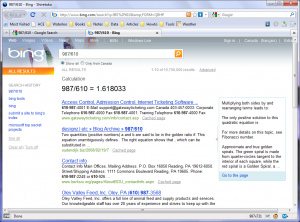
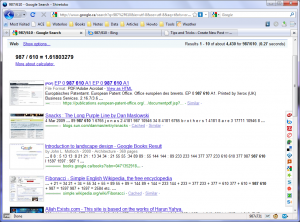
Notice I did make my web page viewing area exactly 987×610 using the firesizer extension. The exact specs for having a big back button and the bookmark toolbar is 121+610=731. Not amazing, but that’s what painters like Davinci and Mondrian did.
There’s a handy feature in Notepad++ that’s not enabled by default.
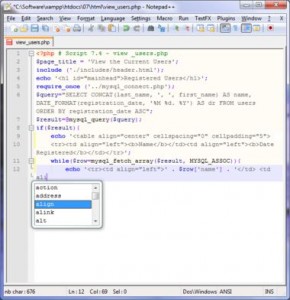
This works on Windows 7 or Vista, but the pop-up window blinks. Here’s the way to enable it:
- Settings -> Preferences -> Backup/Auto-competion
- check enable auto-completion
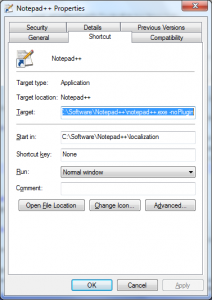
- right-click and edit properties for Notepad++
On another note, you can make it load faster by adding the -noPlugin flag to it:
If you are a fan of Google Docks (available in Chinese among other languages) or Windows Hoax (has been available in Beta or RC), then you might want to might want to install the MinSJ script, meaning Minimal Script Junkie. I actually thought it stood for Minimu Jumps for Searching, whatever.


If google’s still your way to find answers in the universe, try a greasemonkey script called SearchJump Improved. Also, you may be interested in some other website modifications.